Description
Here is a self made Dragonscale Brush for Sculpting in Blender.

Tested on Suzanne:

Tested on Cube:
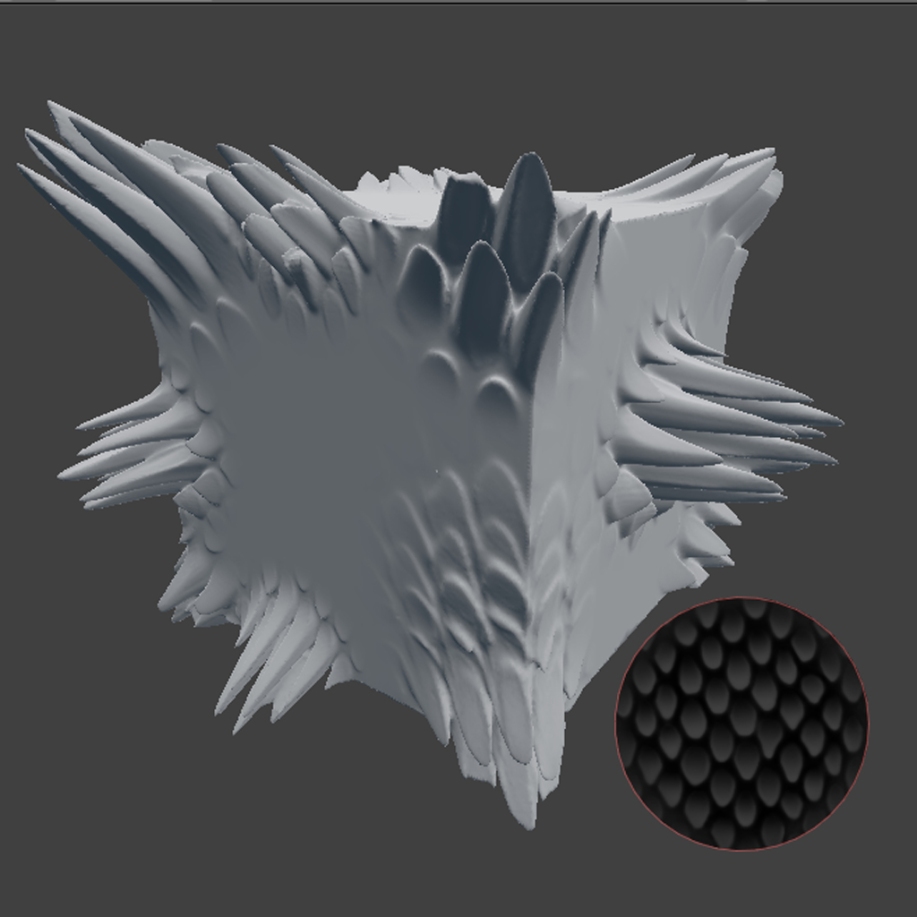
Dont forget to enable Dynamic Topology :)
Minimum Detail Size 4

Dragonscale Brush
3D Model
3
3DHaupt
Uploaded over 12 years ago
- Downloads
- 4,179
- Likes
- 70
- License
- CC-BY
- Category
- Miscellaneous Objects
- Blender Version
- 2.6x
- Render Engine
- Blender Internal
- File Size
- 635 KB
Comments (30)
Awesome, Would love to see more of this kind of stuff.
THX :) I will uploade more Brushes soon.
check our site www.plaintextures.com... there is thousands of them...
How do you use the brush on other appended blends?
awesome job!!! how do i install it?
Thanks. Just append the scene in to you blend file (File/Append/Dragonscale Brush for Blender/Scene) and than link your model you want to sculpt on in the scene (Object/Make Link/Object to Scene/Scene.001).
Hey! I'm wondering what Append means!
Edit: Even with your tutorial, I can't do this. Can you upload a video or something?
where is the Object/make link/object to scene/scene.001?
Wow, this is great. This one and the dried ground look really cool.
Thank you :)
thanks
Now thats useful for things like fish! Imagine going though and shaping every scale by hand :o
Yeah, the result would be a tenosynovitis, headache and no motivation for completing the fish.
this is really great. i'm in awe
Very nice ! But i have some problems.When i use it (Dynamic Topogolgy activated) it just creates some verts,it isnt making them 3d,for example on the plane it jsut was plane with some more verts
Hello Dakin, you need to unzip the file otherwise the texture path for the brush will not found and than Blender only creates more geometry without 3D deformation, as you said. I think it would be better if I pack the texture into Blender, I will improvers it, so no one needs to unzip the file anymore.
Hey, Dennis, I have a odd question. I have Blender 2.68 and I can't seem to get on the Sculpt Mode. If you could tell me how, that would be great! Thanks! Also, great brush; I've been looking for one of these. :D
I'm really confused as to how to add/import this to blender. (still new)
This brush is amazing! The only problem is I cannot seem to get it to work. I have tried suggestions from previous comments, but it does not work still. I think the issue may be I just downloaded Blender 2.72 and there may be some issues depending on what version of Blender this was made in. Any suggestion son how to fix this will be very much appreciated! I love your work and I will link back to your page here with anything I use!
I'm using Blend 2.74 and I can't add it either. I was really looking forward to making a good looking dragon with this. ;-;
Thank you!!!
did it work for you. can you please help me to install?
did it work for you. can you please help me to install?
i tried all like you have said but it didn't work for me. It automatically shuts down blender. Why it is doing that?
esta genial, gracias por el aporte
Hey! Awesome brush! I see people can't install it, so if you're stuck just do the following: Go to File > Append > Find the blend file > Brush > And pick the brush called "Brush" Now all you have to do is go to sculpt mode, and pick that brush and enable Dynamic Topology Hopes that helps someone
thank you!!!!
Hey! Awesome brush! I see people can't install it, so if you're stuck just do the following: Go to File > Append > Find the blend file > Brush > And pick the brush called "Brush" Now all you have to do is go to sculpt mode, and pick that brush and enable Dynamic Topology Hopes that helps someone
Thank you so, SO much! This saved my project! Even years later, it works perfectly and is still appreciated!
Sign in to leave a comment.