Description
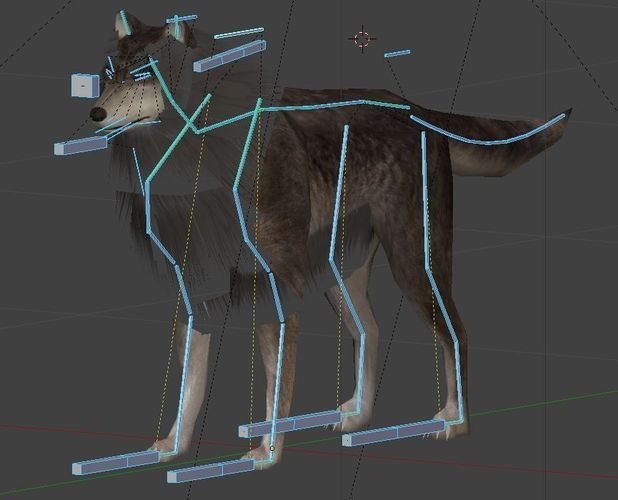
Here is my low-poly [wolf model](https://3dhaupt.com/3d-wolf-rigged-low-poly-and-game-ready-download-walk-cycle-run-sit-creep-idle-animation/) with some basic animations.
I modeled, textured and rigged this wolf 2011.
* [Controllable Wolf - Blender Game Engine](https://www.youtube.com/watch?v=DOox7UoZk_E)
* [Test in Unreal 4](https://goo.gl/bnN1xa)
* [Test in Unity 5](https://goo.gl/4RnyjX)
Work in progress videos from 14.03.2011 to 05.04.2011:
[1](https://goo.gl/2j2gww "Wolf 1"),
[2](https://goo.gl/XvpEv3 "Wolf 2"),
[3](https://goo.gl/bXAAZ1 "Wolf 3"),
[4](https://goo.gl/HWr1Vx "Wolf 4"),
[5](https://goo.gl/okN65k "Wolf 5"),
[6](https://goo.gl/Gz5SlC "Wolf 6"),
[7](https://goo.gl/sxKRrh "Wolf 7"),
[8](https://goo.gl/f3fv80 "Wolf 8"),
[9](https://goo.gl/UnqOEV "Wolf 9"),
[10](https://goo.gl/a6ESMH "Wolf 10"),
[11](https://goo.gl/t4jDw8 "Wolf 11"),
[12](https://goo.gl/eYk1OH "Wolf 12"),
[13](https://goo.gl/gqPn58 "Wolf 13"),
[14](https://goo.gl/4wv6br "Wolf 14"),
[15](https://goo.gl/IVIt3X "Wolf 15"),
[16](https://goo.gl/pZTLco "Wolf 16"),
[17](https://goo.gl/MvKWNK "Wolf 17"),
[18](https://goo.gl/Zbp0RA "Wolf 18"),
[19](https://goo.gl/TvL5KM "Wolf 19"),
[20](https://goo.gl/J8EnTx "Wolf 20"),
[21](https://goo.gl/MloDBM "Wolf 21"),
[23](https://goo.gl/0rMsyL "Wolf 29"),
[24](https://goo.gl/7I0LNm "Wolf 24"),
[25](https://goo.gl/Bmmmzj "Wolf 25"),
[26](https://goo.gl/jlVe6A "Wolf 26"),
[27](https://goo.gl/IlRN9s "Wolf 27"),
[28](https://goo.gl/qqO98K "Wolf 28"),
[29](https://goo.gl/TDCTaO "Wolf 29"),
[30](https://goo.gl/1uYXBq "Wolf 30"),
[31](https://goo.gl/xWtSvy "Wolf 31"),
[32](https://goo.gl/38DAcq "Wolf 32"),
[33](https://goo.gl/zgESYb "Wolf 33"),
[34](https://goo.gl/DIwgri "Wolf 34"),
[35](https://goo.gl/9Z5qoC "Wolf 35"),
[36](https://goo.gl/8KbWhH "Wolf 36"),
[37](https://goo.gl/kD85VP "Wolf 37"),
[38](https://goo.gl/xklo8E "Wolf 38"),
[39](https://goo.gl/NCHqw8 "Wolf 39"),
[40](https://goo.gl/qboK3a "Wolf 40"),
[41](https://goo.gl/c2zfoM "Wolf 41"),
[42](https://goo.gl/vYw7rz "Wolf 42"),
[43](https://goo.gl/hIxbej "Wolf 43"),
[44](https://goo.gl/8NjH2C "Wolf 44"),
[45](https://goo.gl/HXv7Yr "Wolf 45"),
[46](https://goo.gl/8PS487 "Wolf 46"),
[47](https://goo.gl/Qqr6zt "Wolf 47"),
[48](https://goo.gl/yI65uJ "Wolf 48"),
[49](https://goo.gl/DLgQQv "Wolf 49"),
[50](https://goo.gl/5dKZbi "Wolf 50"),
[51](https://goo.gl/UvMW8t "Wolf 51"),
[52](https://goo.gl/p0Pqbi "Wolf 52")


Wolf animations:
* Run cycle
* Sit
* Creep animation
* Idle animation
Wolf animation control in Blender Game Engine:
* W-Key = Walk cycle
* E-Key = Run cycle
* R-Key = Creep cycle
* Spacebar = Sit




Comments (115)
amazing work!
thank you ^^
i like how if u stay fouces u will come out with amazing work like this:D
Fantastic thank you :)
Just impressive :) I look forward to see the following of this project !
this is amazing work! professional grade with 3d fur!
teats so cool can i use it in my game :)
i mean ''thats'' sorry
no problem using it for your game ^^
I'm making a animation and I would like to know two things, One can I use it in a animation? and two What should I use to extract the file? (All credit goes to you, I will link your channel)
of course you can us the wolf for your game, if you make a video of it please credit me^^
I WILL!
I dont know why this isn't the top faved and in the staff pick yet lol!
I can't get it to work :/
try to append the blendfile into a new blend. maybe you computer has some problem with GLSL.
amazing work!
thank you :)
When I click on download it only loads the page new... Help!!! :(
good work
How did you do the animations, that's great
Awesome! But is has no creek animations, and he doesn't good as good as in the video. But other than that real good job! :D I love it
I've forgotten to adjust, I had to prepare the file for Blender 2.62. I will improve it
I added the missing animations new
*now
You are freaking amazing... I love you ..
really coool XD.
i am new here may i download this for my game... so yes how can i download?
Use of the file depends on the cc license. in this case It is cc-by. I would say yes, you probably can as long as you credit the original creator.
sorry for me messages i am new so i didnot know some thing but can you send me the modeling only ??? i would love. tnks
Wow, this is an amazing model! I still have no clue how people make these, lol. I wanted to ask, I've been skimming the web forever, is this up for use with credit to you, the creator? I'm making a 3D-Blender animation on a book series I'm doing, that's why I was wondering ^^ Thanks, Sage
Excellent job man! Wish you much luck in your games. ..and me now to research how did you do that animations and solve controls.. ..and yeah..on my machine it is E key- sit animation?! (doesn't reduce the greatness of project at all..:) Chears!
can i use this in unity?
he says you can use it in your games, just make sure that you credit him
Man i LOVE IT!
Hey you should use the model from zeldacapital.com! If your reading this it will be AWESOME!!!!!!!!
when i try to export it to a .x, the hair on the bottom/the neck is white when i try to use it in the game i'm developing ... any help ? :\
It doesnt work for me. It works just fine in blender. But as soon as i export it. It just screws up. Can you make the animations as seperate files?
wow what a amazing wolf
cute wolfy dude oO
Great wolf model. New to game dev, but this would work perfectly in my project. Now, to break free from Unity and learn Blender, hah! I'd love to see the finished product this was used in!
Great model. Smooth animations.
very good congratulations my friend
Amazing. I would love to have half the skill shown.
Excellent walk and run? cycle animations!
Hi, are you still working on this? Well just for the heck of it I added some trees and mountains for the game+ controls. I haven't uploaded it but I actually acedently deleted it. Just one question, could you make a tutorial for this or have you already? I mean if that is going to be a real hard thing to do it's fine if you don't, I'm just trying to learn to rig and I need some help. And after seeing what you can do, you just deemed like that kind of guy! Thanks!
Nice, but when parent my own mesh to your rig I only get 3 actions in the action editor- creep, Wolf_maul_roll.001, wolf_wartepose.001. Also in the original, the actions aren't selectable I click on wolf_walk and he still does his idle. I don't know anything about bge, is there some setting I can use to make it a 'regular' blend file?
In the newer blender versions the animation-system and the logic-editor has changed, if i find time i will fix it.
Never mind, I see the actions now, I appended them from another copy. This rig works in Unity 3d. I deleted all the head bones back to Kopf and just made a upper head and a lower jaw, better for noobs. The dog in Unity http://youtu.be/Oir0JMkJJxE
looks good so far, you'll texturing the dog?
very good.
Hey there, do you have any other format i could use?
You can use blender to export the wolf in a format of your choice. .obj, .fbx, .3ds, .dae...
i never did blender, but i am unity developer. How can i get the right format with working animations? i tried exporting but only the model comes with no textures or animations. any ideas?
I love your wolf! When I export it in Blender render, it doesn't show the fur very well. i was wondering if there is a better way to render it in blender render? thanx!!!!!!!!
You just need to edit the settings of the fur material, I will make a update for rendering soon.
How do I like change the fur color and the eyes
for the eyes you can edit the texture, and for the fur you can do the same but also you can tint it in the material settings
Does this model work in Unity?
Yes of course, if you know how export and set it up, perhaps there some problems with the animation, i don't know if Unity supports everything, I have no experience with Unity, I think a rootbone is missing in the armature but it is easy to add on.
* to add one
Ok thank you very much
Have you tested it? does it work?
Beautiful wolf. Very well done, especially the rigging and animation. Just a couple things I noticed. The skin - wolf col - Image Mapping is set to Y: 2 which messes up the render. Even if it looks fine in the 3D View, it needs to be set to 1. And also the fur transparencies didn't transfer over to render either, so I had to switch the image texture fella3 to a .png and remake the material to get it to render properly.
Thank you :) I created this wolf to run in Blender Game Engine, and not for rendering. Feel free to upload your version for Rendering.
There was some problems with the animations in Blender 2.68a. I fixed it, all animations work now better than before. New Controls: Start : P key Walk cycle : W key Run cycle : E key Sit animation : Spacebar
Excelent work!
Thanks :)
So impressive =D ^_____^
Wow! Impressive!
hey, is there a full version of the music from the YouTube video? im making an light show animation with it but the sound cuts off at the middle of the music.
Yes, here is a link to the full version of the soundtrack composed by Aaron Costain. http://www.youtube.com/watch?v=LzGAMIlxXrg
Thanks!
wait...no not that one i was talking about this one http://www.youtube.com/watch?feature=player_detailpage&v=I5Kiukc4z9A is there a full version of this music?
Okay, think i found it http://www.youtube.com/watch?v=H_Lfg36ty2Y. Do not forget to credit Aaron Costain if you publish your light show animation Video :)
Ok. I wont forget
I can't work!!! I can't open this.
Uploaded on my bithday lol
happy birthday, lol ^^
Dennis I put your wolf in my game demo, try it! https://sites.google.com/site/terrymorgan1213/bogwood-down
Awesome Oo >>>> i need to Check this :)...I will give your feedback soon and I am glad you find a use for this wolf ^^
nice
for some reason it won't let me on it ):
Cool!
can someone please help me.. how am I doing that the wolf will run and animate?
Hi there! I used your wolf in my game, Hunt For Food, you can see it in action here. -- https://www.youtube.com/watch?v=FSzeZSMKh7c Thanks a lot man!
NICE :) and it's a great game Idea keep it up. I always like to see what happens with my blends :)
Love your work...
Nice work...
Wow ... amazing :D
this is an absolutely BEAUTIFUL model. and letting us use it FOR FREE? you are an amazing person C:
Thank you Derpydp! It's all for the best software of world and the community :)
Hi , I am new to blender, I found your work in youtube. I have a small request, you can better make a tutorial for students like us, so that it will be really useful for us to learn more about it. Its really a fantastic job done by you @DennisH2010. Thank you
@DennisH2010, thanks a lot for this awesome wolf model! We have created the game, in which it has been used. You can check out this game here: indiedb.com/games/return-of-red-hood
Is there Mesh for model? I need one xD
Awesome! Great work.
Just, awesome!
:ooooo ty !
Very Nice
I want to use this model and rig in a movie I am making, but I don't know how to remove the current animation and game data from the download file. Any help would be appreciated!
By the way this is an excellent model thank you so much for letting us use it free @DennisH2010
Anyone know how to do this? ^^^
2017/04 thanks it s still awesome
thank you very much.your work will help me learn animation
Hi. I would like to use this in a single rendering for an indie card game (commercial) for one card's face. Would you be open to granting an exception for such use? Thank you in advance for your consideration.
nice one, G
404 error... One download lost
yup 404...download is not working.. i am very sad right now,it is awesome model
Correction i am very happy to find alternative links for download !!! :D https://www.youtube.com/watch?v=DOox7UoZk_E It is an awesome model !!!
wow, this is amazing! i'm fairly new to blender and it's saving as a .zip file, although i'm not sure how to actually import it into it. is there a way to do that? i absolutely love the animation by the way!
thanks man, it really helps the beginners like me
Sign in to leave a comment.