Description
Hi,
This blend came about after a [question from OD91](http://www.blendswap.com/questions/view/499) about how to model [this lamp](http://www.pasteall.org/pic/show.php?id=67682). (Well, it's a fashiondisplay, we make it a lamp).
Design is from Ola Shibib and the picture came from [Shape Studio](https://www.facebook.com/artinshape)
Toggling the previewpictures will fake the lightswitch.(Once they're downloaded to your browser.)
Some testmodeling slowly and sneakily became a full model, so then ofcourse he made me upload and explain....See in the comments below...
Lamp-Q499
3D Model
R
rianvermeulen
Uploaded about 12 years ago
- Downloads
- 390
- Likes
- 15
- License
- CC0
- Category
- Architecture
- Blender Version
- 2.7x
- Render Engine
- Cycles
- File Size
- 340 KB
Comments (14)
As you can see the lamp has a repeating pattern and if we swap each part with a (once divided) plane it looks like this: 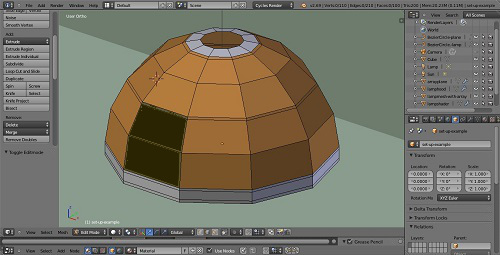 The brown is the pattern, the white rims we will extrude later-on, and the dark-brown is the only part we have to model, because we will use arrays and and a circular curve. This is a standardtechnique and if you don't know it, watch this tut from Andrew Price [how to make a cartyre in blender](https://www.youtube.com/watch?v=WhmRn-tYtxE) :D The set-up would look like this 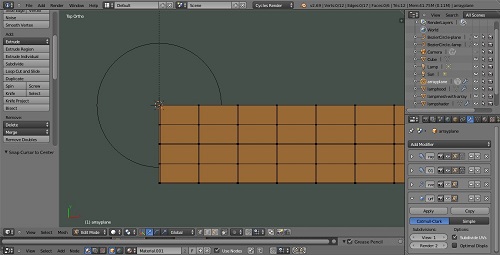 Modeling: Add the backgroundimage and a plane, subdevide 10 times (that's 10 loops, not 10 mouseclicks), delete all except the rim, select one vert, shift-D, grab and now outline the holes by extruding this one vert. Fill with planes when ready. You will have to move the outer rim a bit. Keep in mind that the arrays have to merge later on so keep adjacent (=opposite) rims the same by only moving those verts in pairs. The result should look like this, though less sloppy if you want a crease or a bevel. I had to remodel. 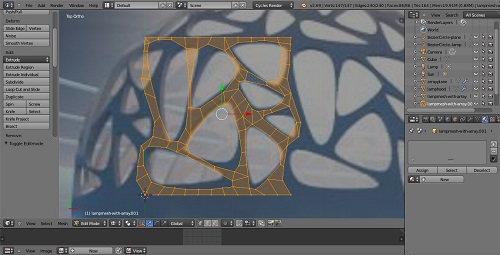 As you can see I compensated for the perspective warping by using adjacent shapes as well. Here we add the two arrays, but if we ad the curvemodifier now we only get a cilinder. We need one more curve, and we could use another curve-mod for that, but instead we apply the vertical array straight away now, and use the warptool for that second curve. Now I can't explain everything full scale, if you don't know this tool then read this [warp transformation](http://wiki.blender.org/index.php/Doc:2.6/Manual/3D_interaction/Transformations/Advanced/Warp) You'll find the tool under mesh,--- transform,---warp. Warp some 85-ish degrees (the safe side of 90) in editmode toward what will be the inside.Things should look like this in objectmode now:(without the curve-modifier) 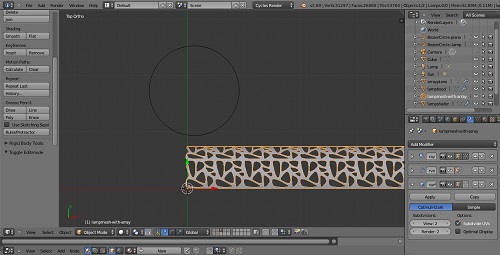 And like your lampshape in objectmode, when you enable the curve-mod again. The rest is straightforward: Add solidify, subsurf, a crease or a bevel, apply the array and the curvemodifier....(unfortunately you have to because of that final seam): 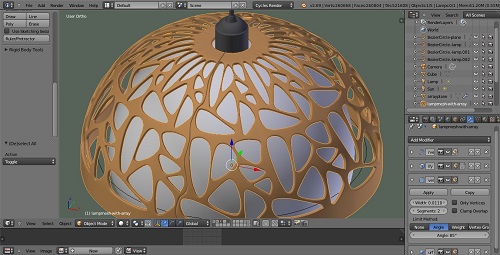 The array should merge first and last too, (I think?) but it never does. You must do it by hand which means apply the curve first. Cherio.....
Awesome !!! It just looks like a real lamp with realistic light effect. Good tutorial as well!!
Why, thank you,...
Nice i tried to make that effect too! cant say i did an as good job! That second preview render... exactly the scene i had a hard time lighting!
Thanks, and well, I told you: It's done in the compositor. But check it out. It's just 1MB ánd CC0.... :) I disabled the compositor, because otherwise it would cut in on ALL the renders, but you can hook it back up easily enough, settings are still there.....
yup im ok with the compositor.... somewhat,... i think! haha i did mess around with it a little. I did not do mine in the compositor: dident think of it that way. i used ray visibility. Well that can be tweaked in the compositer to... lol
Thankyou great model!
Thanks, and you're welcome... :)
I struggled for weeks trying to accomplish this lighting effect for the Bates Mansion. I never succeeded.
Well, check it out then, that's what we're here for. :) It's got a pleasant spartanstyle set-up: no superfluous fancy footwork, except maybe the lampshader material, but you don't need that if the lamp isn't in view. And, (just guessing what you're after here) Like with real camera's: that shady half-lit look of the dimlight can't be accomplished by tweaking down the light-strenght. You need to properly light the scene, and then tweak brightness, contrast and saturation in the compositor... :)
woooowww amazing.... seems difficult to model but as you have done, it looks great and easy
Thanks, modeling does seem difficult sometimes. Luckily with Blender we have this complete bucketfull of amazing modelingtools at our disposal. :)
Sorry wrong post: dont know how to delet it
bagus sekali...ijinkan saya menconya
Sign in to leave a comment.